
CAT6 Vs Cat7 Cabling
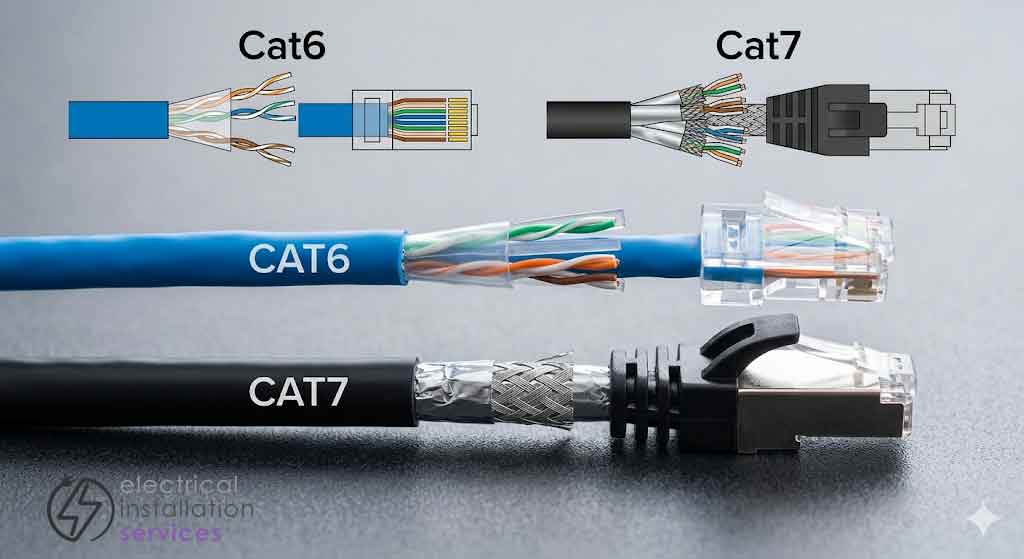
Think of Cat6 vs. Cat7 as a choice between “enough for now” and “overkill for later.” You shouldn’t just pick the higher number because it sounds better—it’s often a logistical headache that offers zero benefit for 99% of standard office setups.
Be objective about what you’re actually doing. If you’re just pushing standard internet and a few VoIP phones, Cat7 is a waste of money. It’s stiff, bulky, and a nightmare to route through tight conduits or old ceiling voids. You might find halfway through a project that your building simply won’t accommodate the thicker shielding and larger bend radius of Cat7.
Then there’s the hardware. Cat7 uses different connectors (GG45 or TERA) to actually hit its rated speeds. If you’re just crimping on standard RJ45 heads, you’ve effectively paid for a Ferrari and capped it at 30mph.
What you actually need to ask:
Is Cat6A an option? It hits 10Gbps without the proprietary connector mess of Cat7.
Physical space: Can your current trays and wall boxes even fit the thicker Cat7 bundles?
Future-proofing: Are you planning on running high-end data centre equipment in three years, or just more laptops?
Don’t get backed into a corner by a spec sheet. If your building’s infrastructure is tight, Cat6 is likely your best friend; if you have the space and a weirdly specific need for massive shielding, only then look at Cat7.
What is data cabling used for?
Look at data cabling as the nervous system of your building. It’s the physical link that stops your tech from being a collection of isolated islands. Whether it’s a standard office network, a high end home cinema, or just getting a stable signal to a CCTV camera, the cable you pull through the walls dictates how well those systems actually talk to each other.
There’s a massive amount of jargon in this space, but here’s the reality of what’s actually being installed right now:
Cat6: This is the current workhorse. It handles 1Gbps easily and is the “safe” choice for 99% of businesses. It’s backwards compatible, meaning you can plug it into older gear without a second thought.
Cat6A: (The ‘A’ stands for Augmented). This is where things get serious. It supports 10Gbps and is becoming the new baseline for new builds.
Note: It is compatible with older Cat6 and Cat5e gear, despite what some outdated manuals might tell you.
Cat7: This is the outlier. It’s heavily shielded and built for massive interference protection, but it’s a niche product. Unlike the others, you can’t just slap a standard RJ45 plug on it and expect it to work properly. You need specific hardware designed for it, or you’re just wasting copper.
Don’t just buy the highest number on the box. If you are not running a data centre or a high-interference industrial floor, jumping to Cat7 might just mean you’re paying for shielding you’ll never use and cable that’s too stiff to turn a corner.
How Does Data Cabling Work?
Forget the technical manuals for a second. At its core, data cabling is just eight copper wires twisted into four pairs, all working together to push electrical pulses from point A to point B.
The “magic” isn’t in the copper itself, but in the twists. Electricity flowing through a wire creates a tiny magnetic field that can mess with the wire next to it (that’s “crosstalk”).
By twisting those pairs at specific, tight ratios, the interference cancels itself out.
As you move up from Cat6 to Cat7, two things happen:
1. The braid gets tighter: Think of it like a more disciplined formation; the tighter the twist, the less “noise” gets in.
2. The armour gets thicker: Cat7 usually adds individual foil shielding around each pair, plus an overall braid around the whole bundle. It’s built like a tank to survive environments with massive electrical interference—think factory floors or rooms packed with power cables.
The 90-Metre Rule
No matter how much shielding you add, physics wins eventually.
Whether it’s Cat6 or Cat7, you’ve got about 90 metres of “permanent link” (the cable in the wall) before the signal starts to degrade.
If you need to go further, you aren’t looking for a better copper cable; you’re looking for Fibre Optics.
Which one actually fits?
Cat6: Your everyday hero. It’s flexible, easy to terminate, and handles Gigabit speeds without breaking a sweat.
It uses the standard RJ45 plug you’ve seen hundreds of times.
Cat7: The specialist. It’s significantly thicker and stiffer.
If you try to pull Cat7 through a tight 20mm conduit where Cat6 used to be, you’re going to have a bad day.
It’s designed for the high-frequency demands of data centres, not for wiring up a standard office printer.
Basically, if you aren’t worried about extreme electromagnetic interference or running 10Gbps+ in a server room, sticking with Cat6 (or Cat6A) saves you a money in both cable costs and installation time.
CAT6 Vs Cat7 Comparison Chart

Cat6 vs Cat7 Summary
Cat6 and Cat7 cables both have their own advantages and disadvantages. Cat6 cables are typically more expensive than Cat5e or Cat5 cables, but they offer improved performance. Cat7 cables are even more expensive, but they offer the best performance possible. Cat6 and Cat7 cables both have their own applications and it is important to choose the right type of cable for your needs. Cat6 cables are typically used in applications where high speeds are needed, such as gigabit Ethernet or 10-gigabit Ethernet.


